





Without tasks
- Requests are buried between everyday messages.
- It is unclear who owns the next step.
- Due dates depend on someone remembering them.
- Finished work needs another round of chasing.
PRODUCT
Assign work, set deadlines, and schedule tasks that repeat.
30-day free trial. No credit card required.

From a one-off request to work that repeats, keep the task, receiver, and deadline together. Your team can see what needs doing and follow the work through to completion.
01
Choose a receiver and add a description so the task is clear from the start.
02
Give each task a due date and see it alongside the work in progress.
03
Schedule recurring tasks for the work your team needs to do again.
IN THE DETAILS
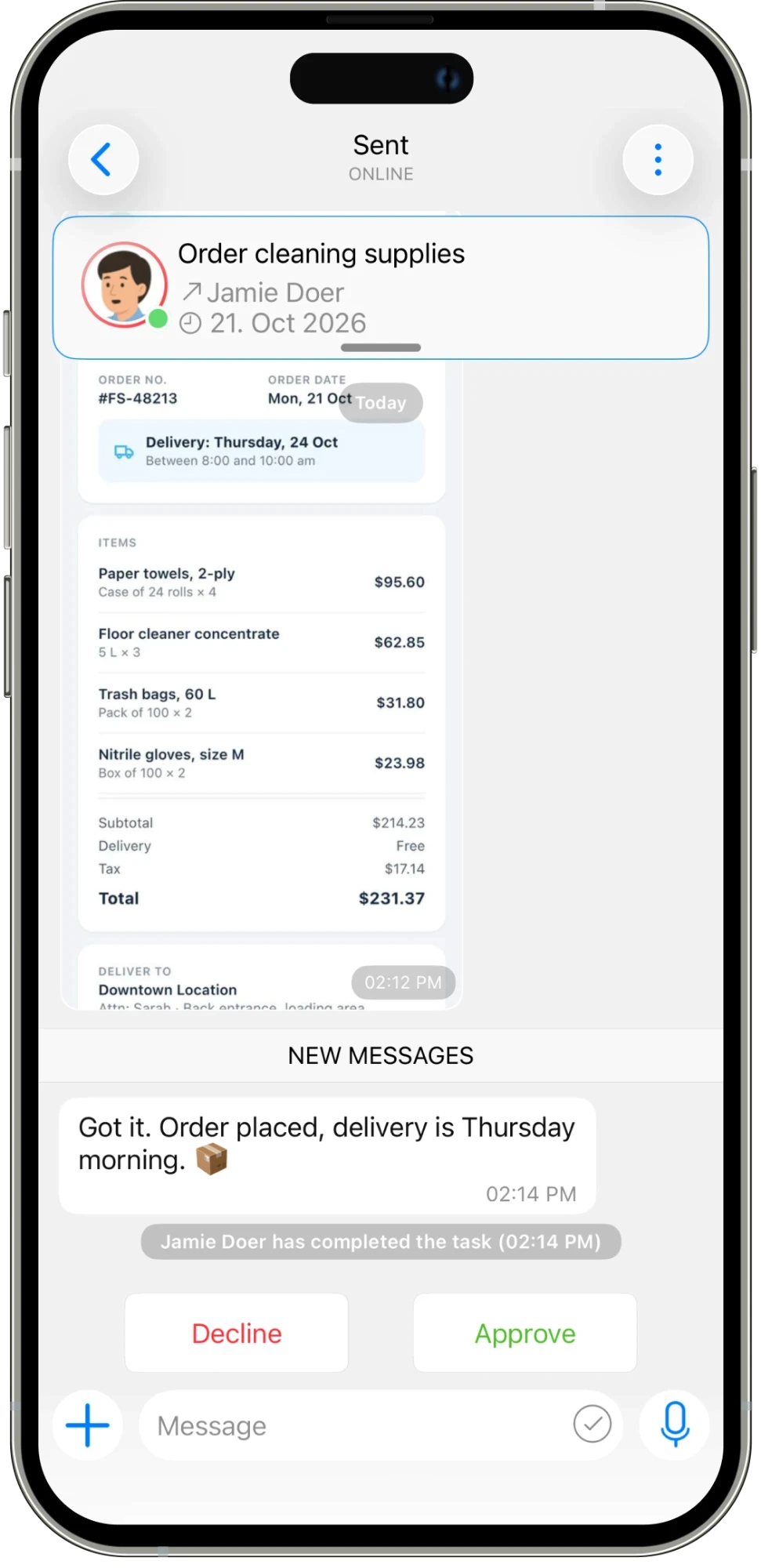
A task gives a request somewhere to live. Add a clear title, choose the receiver, set a deadline, and describe what a good result looks like. Attach a photo, file, or location when the work needs more context. Instead of asking your team to piece together instructions from several conversations, give them a single place to start. The same structure works for an urgent repair, a supply order, or the next inventory count.
CONNECTED WORK
Some work happens once. Other work comes back every day, week, or month. Set recurring tasks for the routines your team needs to repeat, with the owner and steps already clear. When work is underway, its conversation stays attached to the task. A receiver can share an update or photo, mark the work complete, and leave the result ready for approval. The request, discussion, and outcome remain together.
AN EVERYDAY EXAMPLE
A store manager creates “Order cleaning supplies,” assigns Jamie, and adds the deadline and order details. Jamie places the order and shares confirmation in the task chat. The manager reviews the update and approves the completed task. The next routine order can use a recurring task instead of starting the conversation again.
Assign work, set deadlines, and schedule tasks that repeat.
Explore feature →
Message your team and keep each task’s conversation with the work.
Explore feature →
Get updates and keep everyone informed in one place.
Explore feature →
Organize your work with folders and categories.
Explore feature →
Send pictures, share media, and attach the files your team needs.
Explore feature →
Create sheets, collect answers with polls, and turn steps into checklists.
Explore feature →
Send a location so your team knows where to go.
Explore feature →
Track the time spent on work.
Explore feature →
Measure productivity and review work reports.
Explore feature →
Try Please Do It with your team, or walk through your day-to-day workflow with us.